
Coding & Development🤖claude💬gpt🌐universal
MulmoTerminal
Run multiple Claude Code and Codex sessions in parallel — a browser terminal grid that shows which agent needs you. Local, tmux-backed, MIT.
Quick Start
Install this Skill
npx skills add receptron/mulmoterminal# MulmoTerminal **Run multiple Claude Code and Codex sessions in parallel — and see which one needs you.** A **browser terminal** for **parallel AI coding agents**: several **Claude Code** and **Codex** sessions side by side, each in its own cell, with the one that needs you marked in colour. Vibe coding with a single agent needs nothing but a shell — this is for when you run several and lose track of which is waiting. Sessions survive a reload (tmux), work isolates in **git worktrees**, and a **phone push** reaches you when a turn finishes. **Every cell is a real pty.** `htop`, `lazygit`, a dev server and Claude Code are the same kind of object here — which is why the one-session-per-worktree limit applies to **agents only**, and a shell or a `yarn dev` launcher can sit in the same worktree an agent is working in. ## Demo 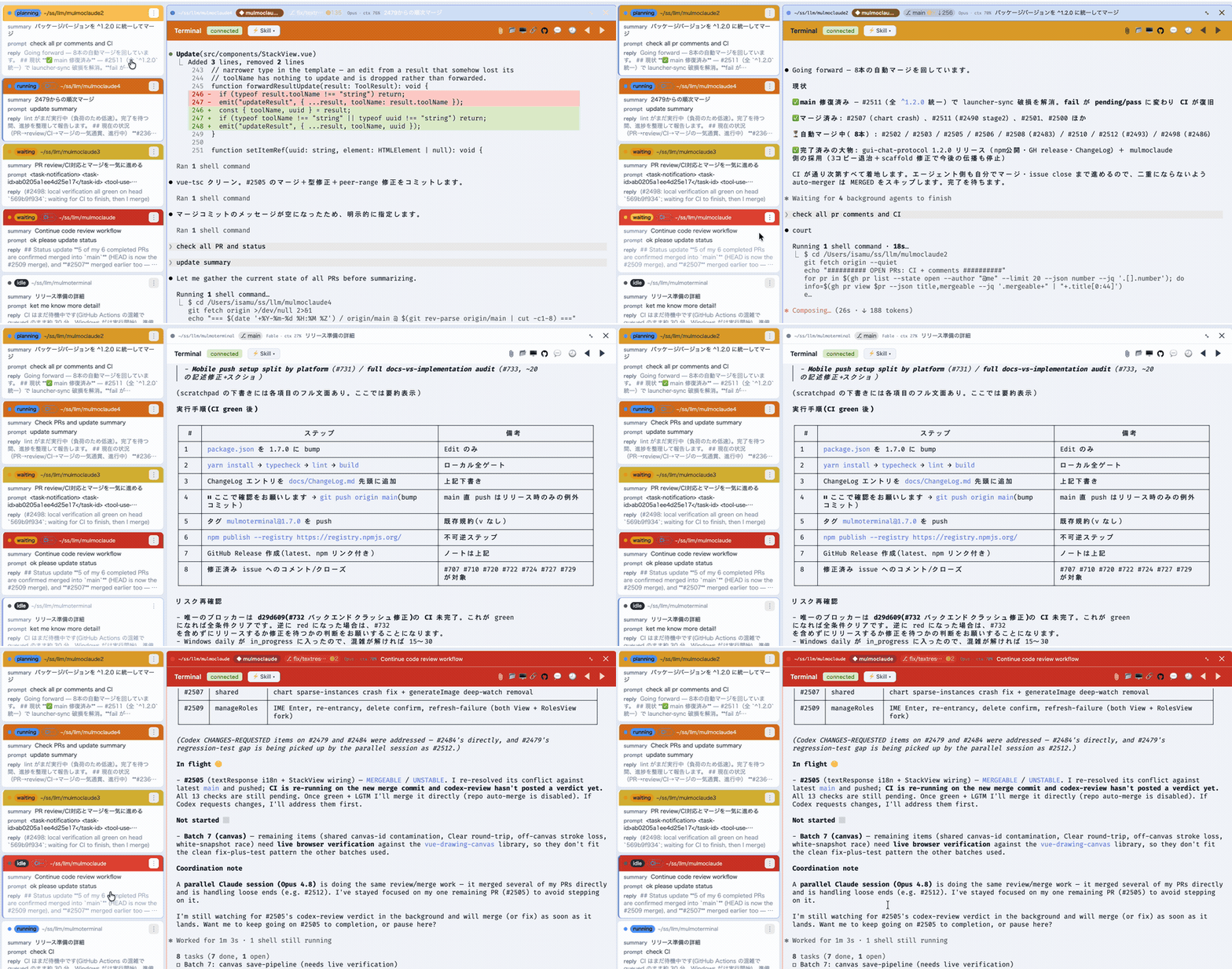 *The grid, live — each cell coloured **working**, **done** or **needs you**.* https://github.com/user-attachments/assets/0b8dd582-6c0d-4be3-b0b4-3740ad0bdba6 *90 seconds, with sound: one agent, then a grid of them. Zoom into one and the roster still holds what every other session asked, answered and did, so you go to whichever is lit and lose nothing catching up.* <details markdown="block"> <summary>Transcript of the narration</summary> When you ran one coding agent, the slowest thing in the room was the agent. Now that you run five, the slowest thing in the room is probably you. One of them is always stopped. A permission prompt. A question. Until you notice, it does nothing at all. MulmoTerminal puts every session on one screen. Blue is working. Green is done. Amber is waiting on you. You stop hunting. You go where the light is. The other kind of slow is: what did I even ask this one? The roster keeps one line per session — what you asked, and what came back. Nothing left to remember. When one is done, you don't go looking for its window. Click its row — the next order goes in right there. Then you pick the next one from whatever is lit. Click, answer, move on. You never go looking — the roster tells you. We built MulmoTerminal for exactly that: not to watch agents, but to triage them. That is the whole install. </details> MulmoTerminal turns [Claude Code](https://claude.com/claude-code) (and OpenAI's **Codex**) into a parallel, observable workspace: many agent sessions at once in a grid, each one color-coded so you see at a glance which are **working**, which **need you**, and which are **done** — plus rich GUI output, git worktrees with one-click PRs, cost readouts, and a ping to your phone when a task finishes. One `npx` command, no Electron, no config. ```bash npx mulmoterminal@latest # starts on http://localhost:34567 and opens your browser ``` Requires **Node ≥ 22.9** and the [`claude`](https://claude.com/claude-code) CLI on your `PATH`, already logged in. `npx mulmoterminal@latest init` reports what it can't find. ### Why not tmux + iTerm panes? Running agents in parallel was never the hard part — tmux does that fine. What gets lost is **which** of the five is waiting for you. A pane is opaque: working, finished and blocked-on-a-permission all look the same until you read it. Here every cell reports its state back to one grid — working (blue), done (green), **needs you** (amber) — with a chime when one goes amber off-screen, and a [cockpit roster](#why-youll-want-it) of one line per session so you can answer one without losing your place in the other four. It runs *on* tmux when you have it, for [persistence across restarts](#session-persistence-tmux). Built by **[receptron](https://github.com/receptron)** — **[Satoshi Nakajima](https://x.com/snakajima)**, software architect for **Windows 95** at Microsoft, and **[Isamu Arimoto](https://github.com/isamu)**; the same two behind **[GraphAI](https://github.com/receptron/graphai)**. [More ↓](#who-builds-this) ## Why you'll want it - **See every agent at once.** A grid of live sessions, each cell color-coded by state — **working** (blue), **blocked / needs a permission** (amber), **done, unreviewed** (blue), **idle** — with an attention chime and a toolbar tally, so an off-screen agent that's stuck never slips past you. Stop babysitting one terminal; supervise ten. Zoom into one and the **cockpit roster** keeps everyone else in view — one text row per session with its AI summary, last prompt, latest reply, and the branch's **PR phase** (draft / CI fail / ready / merged). - **A GUI for your agents, not just a terminal.** Beside the terminal, a **Canvas** panel renders what an agent produces over MCP — **documents, forms, charts, generated images, HTML, collection cards** — each drawn by its own plugin. The agent doesn't just print text; it hands you an interface. - **Get pulled back from any ... (truncated)
Repository
189stars
29forks
Details
Related Skills
More coding & development skills you might like
Reticle
Coding & DevelopmentAI agents can generate code, but still struggle to understand what they build. Reticle brings Jev-style machine-native runtime perception to web & desktop applications.
🤖claude🌐universal
1.2k
190
View
agentscope-java
Coding & DevelopmentExpert Java developer skill for AgentScope Java framework - a reactive, message-driven multi-agent system built on Project Reactor. Use when working with reactive programming, LLM integration, agent orchestration, multi-agent systems, or when the user mentions AgentScope, ReActAgent, Mono/Flux, Project Reactor, or Java agent development. Specializes in non-blocking code, tool integration, hooks, pipelines, and production-ready agent applications.
🌐universal
6.0k
1.5k
View
ospec
Coding & DevelopmentDocument-driven OSpec workflow for initialization, change/goal routing, validation, archiving, and durable project knowledge.
✨gemini🤖claude💬gpt🌐universal
524
34
View
misakanet-failure-memory
Coding & Development📚 A zero-dependency, git-backed micro-lesson library for AI Agents to asynchronously share and search verified debugging experience. Python stdlib only. | https://misakanet.org
🤖claude⌨️cursor🌐universal
424
158
View