
Coding & Development✨gemini🤖claude💬gpt⌨️cursor🌐universal
MDC Rules Generator
Curated list of awesome Cursor Rules .mdc files
Quick Start
Install this Skill
npx skills add sanjeed5/awesome-cursor-rules-mdc# MDC Rules Generator
> **Disclaimer:** This project is not officially associated with or endorsed by Cursor. It is a community-driven initiative to enhance the Cursor experience.
This project generates Cursor MDC (Markdown Cursor) rule files from a structured JSON file containing library information. It uses Exa for semantic search and LLM (Gemini) for content generation.
[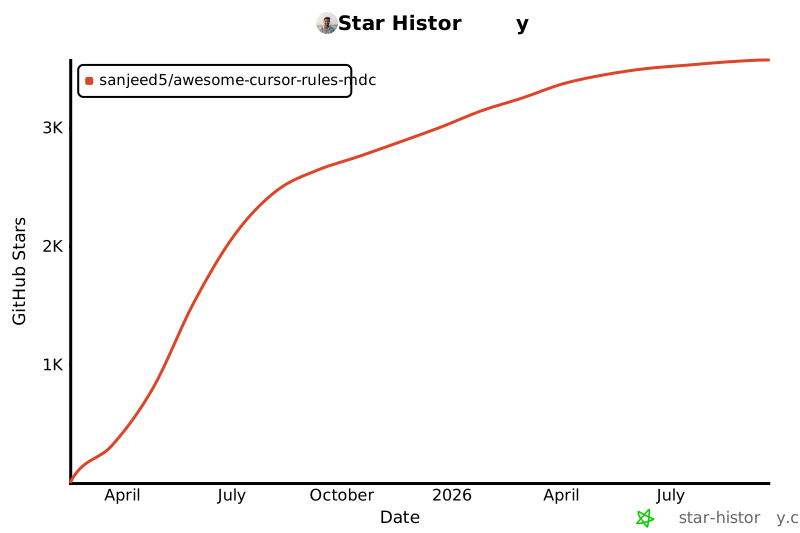](https://www.star-history.com/#sanjeed5/awesome-cursor-rules-mdc&Date)
## Features
- Generates comprehensive MDC rule files for libraries
- Uses Exa for semantic web search to gather best practices
- Leverages LLM to create detailed, structured content
- Supports parallel processing for efficiency
- Tracks progress to allow resuming interrupted runs
- Smart retry system that focuses on failed libraries by default
## Prerequisites
- Python 3.8+
- [uv](https://github.com/astral-sh/uv) for dependency management
- API keys for:
- Exa (for semantic search)
- LLM provider (Gemini, OpenAI, or Anthropic)
## Installation
1. Clone this repository:
```bash
git clone https://github.com/sanjeed5/awesome-cursor-rules-mdc.git
cd awesome-cursor-rules-mdc
```
2. Install dependencies using uv:
```bash
uv sync
```
3. Set up environment variables:
Create a `.env` file in the project root with your API keys (see `.env.example`):
```
EXA_API_KEY=your_exa_api_key
GEMINI_API_KEY=your_google_gemini_api_key # For Gemini
# Or use one of these depending on your LLM choice:
# OPENAI_API_KEY=your_openai_api_key
# ANTHROPIC_API_KEY=your_anthropic_api_key
```
## Usage
Run the generator script with:
```bash
uv run src/generate_mdc_files.py
```
By default, the script will only process libraries that failed in previous runs.
### Command-line Options
- `--test`: Run in test mode (process only one library)
- `--tag TAG`: Process only libraries with a specific tag
- `--library LIBRARY`: Process only a specific library
- `--output OUTPUT_DIR`: Specify output directory for MDC files
- `--verbose`: Enable verbose logging
- `--workers N`: Set number of parallel workers
- `--rate-limit N`: Set API rate limit calls per minute
- `--regenerate-all`: Process all libraries, including previously completed ones
### Examples
```bash
# Process failed libraries (default behavior)
uv run src/generate_mdc_files.py
# Regenerate all libraries
uv run src/generate_mdc_files.py --regenerate-all
# Process only Python libraries
uv run src/generate_mdc_files.py --tag python
# Process a specific library
uv run src/generate_mdc_files.py --library react
```
## Adding New Rules
Adding support for new libraries is simple:
1. **Edit the rules.json file**:
- Add a new entry to the `libraries` array:
```json
{
"name": "your-library-name",
"tags": ["relevant-tag1", "relevant-tag2"]
}
```
2. **Generate the MDC files**:
- Run the generator script:
```bash
uv run src/generate_mdc_files.py
```
- The script automatically detects and processes new libraries
3. **Contribute back**:
- Test your new rules with real projects
- Consider raising a PR to contribute your additions back to the community
## Configuration
The script uses a `config.yaml` file for configuration. You can modify this file to adjust:
- API rate limits
- Output directories
- LLM model selection
- Processing parameters
## Project Structure
```
.
├── src/ # Main source code directory
│ ├── generate_mdc_files.py # Main generator script
│ ├── config.yaml # Configuration file
│ ├── mdc-instructions.txt # Instructions for MDC generation
│ ├── logs/ # Log files directory
│ └── exa_results/ # Directory for Exa search results
├── rules-mdc/ # Output directory for generated MDC files
├── rules.json # Input file with library information
├── pyproject.toml # Project dependencies and metadata
├── .env.example # Example environment variables
└── LICENSE # MIT License
```
## License
[MIT License](LICENSE)
Related Skills
More coding & development skills you might like
Reticle
Coding & DevelopmentAI agents can generate code, but still struggle to understand what they build. Reticle brings Jev-style machine-native runtime perception to web & desktop applications.
🤖claude🌐universal
1.2k
190
View
agentscope-java
Coding & DevelopmentExpert Java developer skill for AgentScope Java framework - a reactive, message-driven multi-agent system built on Project Reactor. Use when working with reactive programming, LLM integration, agent orchestration, multi-agent systems, or when the user mentions AgentScope, ReActAgent, Mono/Flux, Project Reactor, or Java agent development. Specializes in non-blocking code, tool integration, hooks, pipelines, and production-ready agent applications.
🌐universal
6.0k
1.5k
View
ospec
Coding & DevelopmentDocument-driven OSpec workflow for initialization, change/goal routing, validation, archiving, and durable project knowledge.
✨gemini🤖claude💬gpt🌐universal
524
34
View
misakanet-failure-memory
Coding & Development📚 A zero-dependency, git-backed micro-lesson library for AI Agents to asynchronously share and search verified debugging experience. Python stdlib only. | https://misakanet.org
🤖claude⌨️cursor🌐universal
424
158
View